Best Home Staging Software (2026)
The best home staging software should fit the way a staging company actually works: inventory moves, rooms change, dates overlap, and a creative decision eventually has to become a warehouse load list.
We compared eight options that stagers are likely to evaluate. Five are purpose-built staging platforms; three are broader inventory or client-management tools that can still make sense for a narrower need. We checked official product and pricing pages on July 17, 2026, then compared their fit for inventory, projects, team operations, client workflow, and cost.
No single platform is automatically right for every business. The useful question is which system best matches the part of your operation that is currently hardest to manage.
This guide is published by StageCore, so our perspective is not neutral. We have used the same standard for every platform, linked to official sources, and included meaningful limits for our own product. Verify current terms and test the workflow before purchasing, because software plans change.
Home Staging Software at a Glance
Start with the operational problem you most need to solve. This shortlist narrows the eight options before the detailed reviews and feature table below.
What to Look for in Home Staging Software
Start with the workflow you need to protect, then compare the software against it. These are the capabilities that usually make the biggest operational difference.
Inventory Management
Look beyond a photo catalog. Useful staging inventory software should track units, location, condition, current project, and whether a piece is available for the dates you are planning.
Project / Job Management
Each property should carry the client context, important dates, room plan, assigned inventory, warehouse handoff, install, pickup, and closeout without forcing the team to rebuild the job.
Team Coordination
Shared project details matter, but so do assignments, permissions, calendars, and a clear handoff between the designer, warehouse, field crew, and office.
Mobile Access
Decide whether responsive web access is enough or whether your team needs native iOS and Android apps, offline access, QR scanning, or push notifications.
Load List Generation
A load list should inherit the approved room plan, quantities, packing notes, and item condition. It should help the warehouse execute the design rather than become another list someone maintains manually.
Estimates, Contracts, and Invoicing
Some stagers want a complete commercial workflow inside one system. Others prefer dedicated accounting or CRM tools. Check whether the platform creates these documents directly, connects to another service, or does not cover them.
1. StageCore — Best Overall for Modern Teams
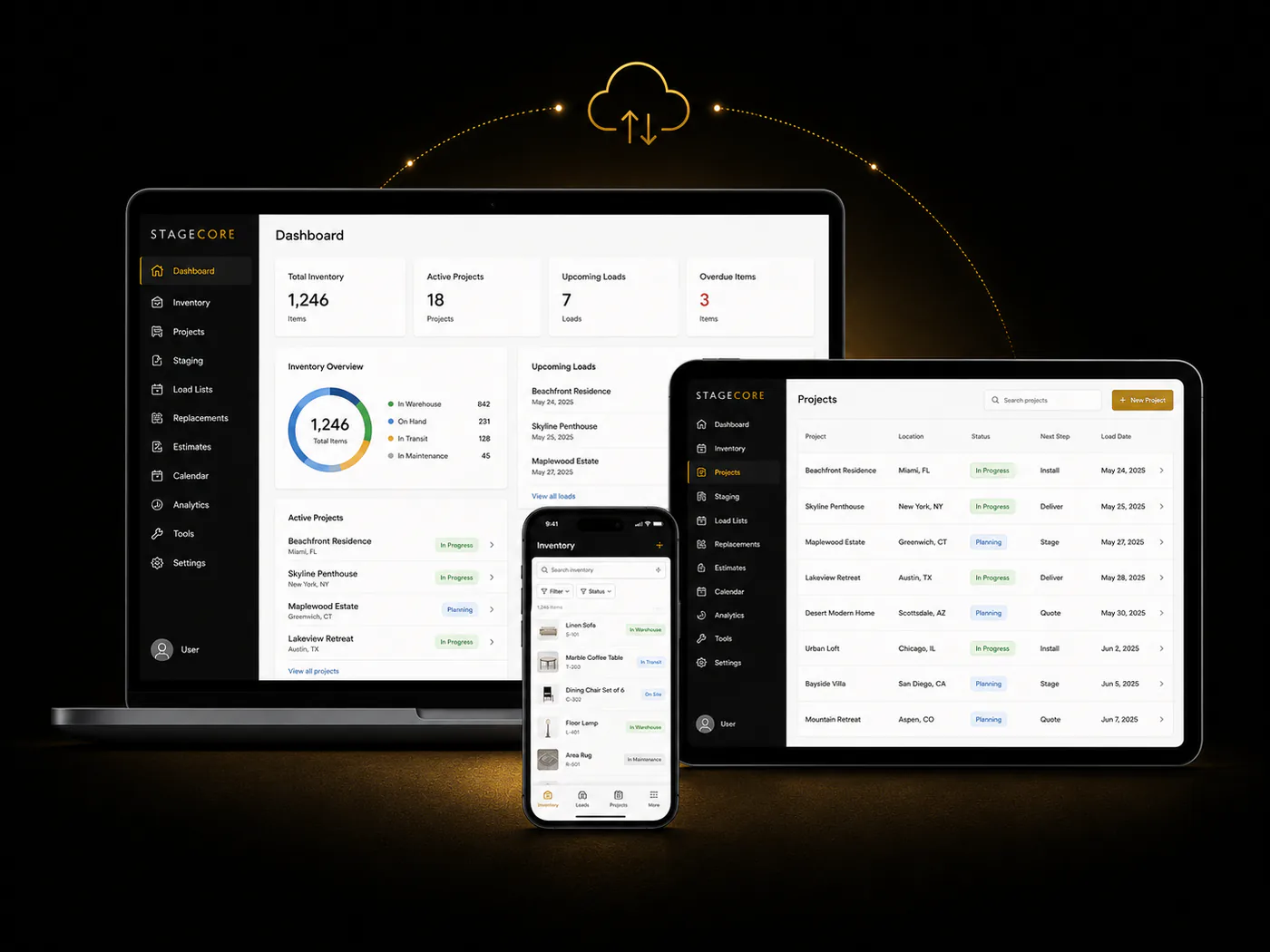
StageCore is built around the complete staging workflow. A project can move from estimate and signed contract into room design, date-aware inventory selection, a connected warehouse load list, installation, pickup, and closeout. Google Calendar, CompanyCam, DocHub, and QuickBooks Online extend that workflow where a specialist tool is useful.
Its strongest differentiator is inventory depth. AI can assist with single items, groups, and larger photo batches; designers can search the catalog in natural language; and availability is evaluated against project dates, including inventory expected back before an install.
- AI-assisted single, multi-item, and batch cataloging
- Room design with date-aware inventory availability
- Estimates, contracts, projects, load lists, and pickup connected
- Natural-language inventory search and flexible unit tracking
- QuickBooks Online invoicing and operational analytics
- Permanent free plan with paid plans from $79/month
- Newer platform with a smaller public customer community
- Responsive web app rather than native iOS and Android apps
- Contracts and invoicing rely on DocHub and QuickBooks connections
2. StageForce — Best Established Full-Stack Platform
StageForce is a mature purpose-built platform covering inventory, projects, CRM, proposals, invoicing, analytics, and an e-commerce storefront for selling staged inventory. RFID, QR, and barcode workflows make it especially relevant to larger warehouses that want physical tagging.
Inventory and Project/CRM Essentials start at $49/month, while the Professional plan starts at $89/month. Current plans advertise a 30-day trial plus unlimited users, projects, and clients; inventory pricing varies with the number of actively tracked items.
- Broad staging-specific inventory, CRM, and project coverage
- RFID, QR, barcode, and print-your-own tag support
- Proposals, e-signature, invoicing, and item sales
- Unlimited users, projects, and clients on current plans
- 30-day trial across paid plans
- Official inventory features do not list AI photo cataloging
- No permanent free plan on the current pricing page
- Full platform starts with the $89/month Professional plan
- Inventory cost scales with actively tracked items
3. Hutch — Best for Established Staging Operations
Hutch brings project management, inventory, and client CRM into a staging-specific interface. Its room-based selection experience is a strength: designers can see what has already been chosen and browse pieces available for the project dates, including items expected back in time.
The current plan is $149/month for up to 10,000 inventory items with unlimited projects, clients, team members, and photo storage. Annual billing includes white-glove project and inventory import, and Hutch advertises a 90-day money-back guarantee.
- Purpose-built project, inventory, and CRM workflow
- Room-based design with date-aware availability
- Up to 10,000 items and unlimited team members
- Strong project photography and reporting
- Annual plan includes assisted data import
- $149/month with no permanent free plan
- Official feature set does not advertise AI photo cataloging
- RFID support is not currently available
4. Stageventory — Best Focused AI Inventory Alternative
Stageventory is a focused staging platform with AI photo recognition, project and room planning, status tracking, QR codes, client history, and analytics. Its interface is centered on getting inventory organized quickly and assigning pieces visually to rooms.
The product uses one $99/month plan after a 14-day trial. Three team seats are included, with additional seats currently listed at $19/month.
- AI-assisted naming and categorization from photos
- Visual room planner with bulk inventory assignment
- Client history, QR codes, condition, and status tracking
- Simple all-features pricing model
- 14-day trial
- No permanent free plan
- Three seats included; additional seats cost extra
- Official feature list does not advertise contracts or invoicing
5. StageVault — Best for Broad Native Features
StageVault offers one of the broadest feature sets in the category: inventory and projects sit alongside CRM, proposals, native e-signature, a pricing engine, client and realtor portals, e-commerce, financing, reporting, virtual staging, and white-label options.
Plans currently start at $49/month, but limits vary significantly. Starter includes 100 inventory items and three active projects; Growth is $129/month; Pro is $199/month and unlocks unlimited usage across many modules.
- Very broad staging-specific business suite
- Native contracts, e-signature, proposals, and invoicing
- Pricing engine, portals, e-commerce, and financing
- Native iOS and Android apps with offline mode
- 14-day trial without a credit card
- Starter plan is limited to 100 items and three active projects
- Many advanced capabilities require Growth or Pro
- Official inventory features do not list AI photo cataloging
6. Sortly — Best for Pure Inventory Tracking
Sortly is a polished general-purpose inventory platform with item photos, folders, custom fields, QR and barcode labels, mobile scanning, offline access, alerts, and reporting. Its free plan supports 100 unique items and one user; paid plans currently begin at $49/month before promotional discounts.
It is a strong choice when inventory is the only problem you need to solve. It does not model staging rooms, property dates, design plans, or warehouse load lists, so a staging company will still need another system for the rest of the job.
- Clean visual inventory interface
- QR and barcode scanning for check-in/check-out
- Offline mobile access and multi-location organization
- Free plan for 100 unique items
- Detailed inventory reporting and integrations on higher tiers
- No staging room design or property workflow
- No project-connected load list generation
- Team seats and larger item limits require higher tiers
- Not built around install and pickup dates
7. Houzz Pro — Best for Client-Facing Design
Houzz Pro is built for contractors and design professionals rather than stagers specifically. Its strengths are proposals, estimates, contracts, invoices, payments, mood and selection boards, 3D planning, CRM, client dashboards, and broader project collaboration.
The limited free tools include estimates, invoicing, and a 3D floor planner. The current Pro plan is $249/month after a 30-day trial. Houzz Pro can run the client and design side well, but it does not provide staging-specific unit availability, warehouse movement, or load list execution.
- Strong client dashboard, proposals, and approvals
- Contracts, invoices, payments, and QuickBooks Online
- Mood boards, selections, sourcing, and 3D planning
- CRM, scheduling, tasks, and mobile access
- Limited free tools available
- No staging-specific inventory availability
- No warehouse load list or return workflow
- Pro plan is substantially more expensive than focused staging tools
- Advanced project features may require a custom plan
8. 17hats — Best for Contracts & Billing
17hats is a service-business CRM built around contacts, projects, quotes, contracts, invoices, questionnaires, scheduling, email, client portals, workflows, and online payments. Its three-in-one quote, contract, and invoice document is particularly useful for keeping the client transaction simple.
A limited free CRM is available, while the current all-inclusive plan is $60/month with a seven-day trial. It can run the client and billing process for a staging company, but it does not manage furniture, date-aware availability, room plans, or warehouse execution.
- Quotes, contracts, invoices, and online payments
- Client portal, scheduling, and calendar cross-checking
- Automated workflows, emails, and document reminders
- Limited free CRM and unlimited projects
- Good fit for a solo service business
- No staging inventory or warehouse management
- No room-based design or load lists
- No project-date inventory availability
- Additional users and some modules can cost extra
Side-by-Side Comparison Table
Here is the practical difference between the five staging-specific platforms and the three broader alternatives.
| Feature | StageCore | StageForce | Hutch | Stageventory | StageVault | Sortly | Houzz Pro | 17hats |
|---|---|---|---|---|---|---|---|---|
| Purpose-built for staging | Yes | Yes | Yes | Yes | Yes | No | Adjacent | No |
| AI inventory cataloging | Yes | Not listed | Not listed | Yes | Not listed | No | No | No |
| Date-aware availability | Yes | Yes | Yes | Limited | Limited | No | No | No |
| Room-by-room design | Yes | Limited | Yes | Yes | Yes | No | Yes | No |
| Connected load lists | Yes | Yes | Limited | Not listed | Limited | No | No | No |
| Client CRM | Yes | Yes | Yes | Yes | Yes | No | Yes | Yes |
| Estimates and contracts | Yes | Yes | Limited | No | Yes | No | Yes | Yes |
| Invoicing | Yes | Yes | Limited | No | Yes | Via QBO | Yes | Yes |
| Native mobile apps | Web | Web | Web | Web | Yes | Yes | Yes | Yes |
| Permanent free plan | Yes | No | No | No | No | Yes | Limited | Limited |
| Starting paid price | $79/mo | $49/mo | $149/mo | $99/mo | $49/mo | $49/mo | $249/mo | $60/mo |
Swipe or scroll horizontally to compare every platform →
“Not listed” means the capability was not advertised on the official product pages reviewed. “Web” means responsive browser access rather than an advertised native app. Prices are standard monthly starting prices before temporary promotions; verify current terms before purchasing.
Which Home Staging Software Fits Your Workflow?
There is no universal winner. The right choice depends on whether your biggest problem is warehouse accuracy, room planning, client administration, or connecting the entire staging job from estimate to pickup.
StageCore is the strongest fit for teams that want one connected operational flow. Estimates and contracts lead into room-by-room design, date-aware inventory, load lists, scheduling, return tracking, and QuickBooks Online invoicing. Its main differentiators are AI-assisted cataloging and the way inventory availability follows project dates. The tradeoff is that StageCore is newer than several competitors, runs as a responsive web application rather than an advertised native mobile app, and uses integrations for DocHub e-signatures and QuickBooks Online accounting.
StageForce and StageVault offer broad alternatives. StageForce is an established staging platform with inventory, projects, CRM, invoicing, physical tagging, and e-commerce options. StageVault combines staging inventory and projects with proposals, contracts, e-signatures, CRM, and native mobile apps. Teams should compare the exact workflows and plan limits they need rather than choosing from feature count alone.
Hutch and Stageventory are focused staging-specific choices. Hutch emphasizes room planning, date-aware inventory, CRM, and assisted migration. Stageventory combines AI photo tagging with inventory, room planning, projects, and CRM in a simpler package. Sortly is best considered when inventory tracking is the primary need, while Houzz Pro and 17hats are stronger for client-facing business administration than staging warehouse operations.
For a connected design-to-warehouse workflow: StageCore. For mature RFID and e-commerce options: StageForce. For broad native CRM, contracts, and mobile apps: StageVault. For room-first planning with assisted migration: Hutch. For focused AI inventory and project simplicity: Stageventory. For inventory only: Sortly. For client administration: Houzz Pro or 17hats.