Staging Inventory Management Software — StageCore
Staging Inventory Management

Staging Inventory Management That Runs on Autopilot

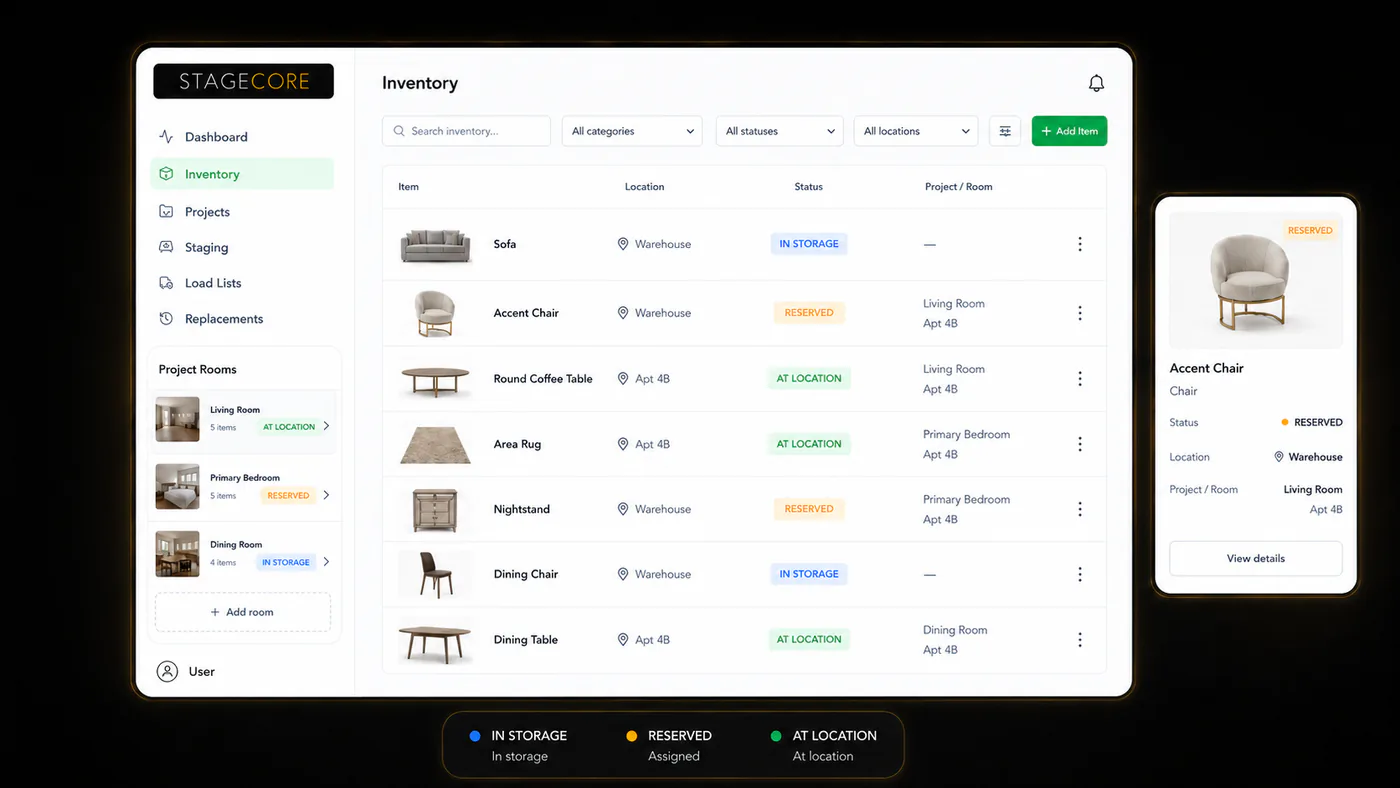
Know exactly what you have, where it is, and when it's available — without calling anyone, opening a spreadsheet, or doing a physical count. StageCore tracks your entire staging inventory in real time.

View Pricing
The Basics

What Is Staging Inventory Management?

Staging inventory management is the systematic tracking of every furniture item, accessory, and décor piece in a home staging business — across every location, job, and team member at any given moment.

For a home staging company, inventory isn't static. A sofa might be in the warehouse Monday, staged at a listing Tuesday, and needed at another property by Thursday. Without a dedicated system tracking that movement, you're flying blind — and the consequences show up as double-booked items, missing pieces before deployments, and time wasted counting stock instead of staging homes.

Effective staging inventory management means having a live, accurate picture of every item's status at all times — from first catalog entry to check-out, deployment, and return. That's exactly what StageCore delivers.

10x
Faster cataloging with AI detection
100%
Real-time inventory visibility
0
Spreadsheets needed
The Real Cost

What Poor Inventory Management Actually Costs You

Most staging businesses underestimate how much time and money they lose every month to inventory disorganization. It's not just an inconvenience — it's a direct drag on profitability.

Hours Lost Before Every Job

Physically walking the warehouse to verify what's actually available before each deployment. This time is invisible in your P&L but very visible in your schedule and your exhaustion.

Items That Disappear

Furniture that gets staged, never gets logged back in, and effectively disappears from your inventory. You replace it at cost before realizing it was in the garage of a property you vacated two months ago.

Missed Revenue

Turning down jobs because you "don't have enough furniture" — when a proper inventory system would show you do. Or over-buying new pieces for a job that required items already sitting in your warehouse.

Double-Booked Items

Assigning the same furniture to two jobs simultaneously because your tracking system couldn't prevent it. The result is emergency reshuffling, delayed deployments, and unhappy clients.

Manual Entry Bottleneck

Every new acquisition requires someone to photograph, describe, categorize, and enter it manually. When you're adding dozens of pieces per month, this becomes a significant administrative burden.

Team Coordination Gaps

Your team members each have a different mental model of what's in inventory. Conflicting assumptions create errors on-site that could have been prevented with a shared, live system.

How It Works

How StageCore Manages Your Inventory

StageCore's staging inventory management system is built around a single source of truth that every team member accesses in real time — updated automatically as items move between warehouse, transport, and property.

01

Snap a Photo — AI Does the Rest

Point your phone at any furniture item. StageCore's computer vision identifies the piece, assigns it a category, and logs it to your inventory automatically. No typing, no forms, no delay.

02

Every Item Gets a Live Status

As soon as an item is in your system, it has a status: available, checked out, in transit, or staged. That status updates in real time as your team moves items — visible to everyone, always current.

03

Assign to Jobs with One Click

When building a load list for a job, select items from your live available inventory. StageCore automatically marks them as checked out and removes them from availability — no double-booking possible.

04

Check Back In from Anywhere

When a staging comes down, your team checks items back in from their phones. Inventory status updates instantly — those pieces are immediately visible as available for the next job.

AI Inventory Detection

Computer vision identifies and catalogs furniture from a single photo — 10x faster than manual entry.

Real-Time Status Tracking

Every item's status updates live across every device your team uses — no refresh, no sync delay.

Multi-Location Support

Track inventory across multiple warehouses, properties, and locations simultaneously — with full visibility into each.

Features

Everything You Need for Staging Inventory

StageCore's inventory management features are purpose-built for the way staging companies actually work — not adapted from warehouse software or retail tools.

AI Photo Cataloging

Photograph any piece of furniture and watch the AI identify it, name it, and categorize it in under three seconds. Build out a complete inventory catalog faster than ever before.

Live Availability Dashboard

See every item's current status at a glance. Filter by category, location, or availability. Know instantly what you can commit to for the next job — before you pick up the phone.

Auto Load List Generation

Assign items to a job and get an optimized, printable packing list automatically generated. Every piece accounted for, in the right order, with no guesswork at the warehouse.

Multi-Location Tracking

Manage inventory spread across multiple storage locations or warehouses from a single view. Know which pieces are where, across every location you operate from.

Mobile Check-In / Check-Out

Your team updates inventory status directly from their phones on-site — no paperwork, no calls back to the office. Status reflects instantly for everyone with access.

Team-Wide Visibility

Every team member sees the same live inventory — no conflicting information, no version confusion. The whole team works from one shared, always-current source of truth.

Get Started

Know Exactly What You Have.
Always.

Start cataloging your staging inventory today with AI that does the work for you. Get complete visibility across every item, location, and job — from day one.

Talk to Us First

Get Started

Join StageCore today. No credit card required to start.

Free Plan
Select Account Method
Or manual setup